Chapter 4.2 - Detect drift locally with Evidently AI
Introduction
The purpose of this chapter is to detect drift by comparing production predictions against a reference dataset built from the training data. BentoML's native monitoring now gives you the current distribution of image features, embeddings, and predicted labels. To know whether that distribution has drifted, you need a reference distribution that represents the data the model was trained on. The prepared training set is the natural choice because it is the exact data the model saw during training.
You will use Evidently AI to generate an interactive HTML drift report and a machine-readable JSON report.
In this chapter, you will learn how to:
- Install Evidently AI
- Build a reference dataset from the training data, including embeddings
- Create a monitoring script that generates an Evidently drift report and dashboard
- Wire the reference build into the DVC pipeline
- Run the pipeline and generate the reference dataset
- Commit the changes to DVC and Git
- Generate production logs and inspect the drift dashboard
The following diagram illustrates the control flow at the end of this chapter:
flowchart TB
    dot_dvc[(.dvc)] <-->|dvc pull
                         dvc push| s3_storage[(S3 Storage)]
    dot_git[(.git)] <-->|git pull
                         git push| repository[(Repository)]
    workspaceGraph <-....-> dot_git
    data[data/raw]

    subgraph cacheGraph[CACHE]
        dot_dvc
        dot_git
    end

    subgraph workspaceGraph[WORKSPACE]
        drift_logs[/"logs/.../data.1.log"/] <---> serve
        subgraph bentoGraph[bentofile.yaml]
            serve[serve.py] <--> bento_model[classifier.bentomodel]
            features[features.py] --> serve
        end
        bento_model <-.-> dot_dvc

        data --> prepare[prepare.py]
        subgraph dvcGraph["dvc.yaml"]
            prepare --> train[train.py]
            train --> build_reference[build_reference.py]
            train --> evaluate[evaluate.py]
            reference_features[/reference_features.parquet/] <---> build_reference
        end
        params -.- train
        params[params.yaml] -.- prepare
        dvcGraph --> bentoGraph
        monitor[monitor.py] <--> reference_features
        monitor <--> drift_logs
    end

    subgraph browserLocalGraph[BROWSER]
        localhost --> |evidently ui| monitor
    end

    subgraph remoteGraph[REMOTE]
        s3_storage
        subgraph gitGraph[Git Remote]
            repository[(Repository)] <--> action[Action]
        end
        action --> registry
        s3_storage --> action
        subgraph clusterGraph[Kubernetes]
            subgraph clusterPodGraph[Pod]
                pod_train[Train model]
            end
            pod_runner[Runner] --> clusterPodGraph
            bento_service_cluster[classifierService] --> k8s_fastapi[FastAPI]
        end
        action --> pod_runner
        pod_train --> s3_storage

        registry[(Container
                  registry)] --> bento_service_cluster
    end

    subgraph browserGraph[BROWSER]
        k8s_fastapi <--> publicURL["public URL"]
    end

    style workspaceGraph opacity:0.4,color:#7f7f7f80
    style cacheGraph opacity:0.4,color:#7f7f7f80
    style remoteGraph opacity:0.4,color:#7f7f7f80
    style gitGraph opacity:0.4,color:#7f7f7f80
    style clusterGraph opacity:0.4,color:#7f7f7f80
    style clusterPodGraph opacity:0.4,color:#7f7f7f80
    style browserGraph opacity:0.4,color:#7f7f7f80
    style params opacity:0.4,color:#7f7f7f80
    style data opacity:0.4,color:#7f7f7f80
    style prepare opacity:0.4,color:#7f7f7f80
    style train opacity:0.4,color:#7f7f7f80
    style evaluate opacity:0.4,color:#7f7f7f80
    style dvcGraph opacity:0.4,color:#7f7f7f80
    style bento_model opacity:0.4,color:#7f7f7f80
    style dot_git opacity:0.4,color:#7f7f7f80
    style dot_dvc opacity:0.4,color:#7f7f7f80
    style repository opacity:0.4,color:#7f7f7f80
    style s3_storage opacity:0.4,color:#7f7f7f80
    style action opacity:0.4,color:#7f7f7f80
    style registry opacity:0.4,color:#7f7f7f80
    style bento_service_cluster opacity:0.4,color:#7f7f7f80
    style k8s_fastapi opacity:0.4,color:#7f7f7f80
    style publicURL opacity:0.4,color:#7f7f7f80
    style pod_runner opacity:0.4,color:#7f7f7f80
    style pod_train opacity:0.4,color:#7f7f7f80
    linkStyle 0 opacity:0.4,color:#7f7f7f80
    linkStyle 1 opacity:0.4,color:#7f7f7f80
    linkStyle 2 opacity:0.4,color:#7f7f7f80
    linkStyle 3 opacity:0.4,color:#7f7f7f80
    linkStyle 4 opacity:0.4,color:#7f7f7f80
    linkStyle 5 opacity:0.4,color:#7f7f7f80
    linkStyle 6 opacity:0.4,color:#7f7f7f80
    linkStyle 7 opacity:0.4,color:#7f7f7f80
    linkStyle 8 opacity:0.4,color:#7f7f7f80
    linkStyle 10 opacity:0.4,color:#7f7f7f80
    linkStyle 14 opacity:0.4,color:#7f7f7f80
    linkStyle 18 opacity:0.4,color:#7f7f7f80
    linkStyle 19 opacity:0.4,color:#7f7f7f80
    linkStyle 20 opacity:0.4,color:#7f7f7f80
    linkStyle 21 opacity:0.4,color:#7f7f7f80
    linkStyle 22 opacity:0.4,color:#7f7f7f80
    linkStyle 23 opacity:0.4,color:#7f7f7f80
    linkStyle 24 opacity:0.4,color:#7f7f7f80
    linkStyle 25 opacity:0.4,color:#7f7f7f80
linkStyle 26 opacity:0.4,color:#7f7f7f80Steps
Install Evidently AI
Add evidently to the project requirements. evidently brings pyarrow
transitively, so Parquet support is available without an extra dependency.
tensorflow==2.21.0
matplotlib==3.11.0
scikit-learn==1.9.0
pyyaml==6.0.3
dvc[gs]==3.67.1
bentoml==1.4.39
pillow==12.3.0
evidently==0.7.23
Check the differences with Git to validate the changes:
# Show the differences with Git
git diff requirements.txt
The output should be similar to this:
diff --git a/requirements.txt b/requirements.txt
index 71d9e04..6501b50 100644
--- a/requirements.txt
+++ b/requirements.txt
@@ -5,3 +5,4 @@ pyyaml==6.0.3
 dvc[gs]==3.67.1
 bentoml==1.4.39
 pillow==12.3.0
+evidently==0.7.23
Install the package and update the freeze file.
Warning
Prior to running any pip commands, it is crucial to ensure the virtual environment is activated to avoid potential conflicts with system-wide Python packages.
To check its status, simply run which python. If the virtual environment is active, the output will show the path to the virtual environment's Python executable. If it is not, you can activate it with source .venv/bin/activate.
Update the experiment
In this step you will create src/build_reference.py, create src/monitor.py,
and add a new build_reference stage to dvc.yaml.
Create src/build_reference.py
This script loads the prepared training set and the saved BentoML model, runs every training image through the model, and stores the resulting scalar features, embeddings, and predictions in a Parquet file.
import sys
from pathlib import Path

import bentoml
import pandas as pd
import tensorflow as tf

from features import (
    build_embedding_extractor,
    extract_prediction_stats,
    extract_scalar_features,
)


def main() -> None:
    if len(sys.argv) != 4:
        print("Arguments error. Usage:\n")
        print(
            "\tpython3 build_reference.py <prepared-dataset-folder> <model-folder> <output-parquet>\n"
        )
        exit(1)

    prepared_dataset_folder = Path(sys.argv[1])
    model_folder = Path(sys.argv[2])
    output_parquet = Path(sys.argv[3])

    # Load training set
    ds_train = tf.data.Dataset.load(str(prepared_dataset_folder / "train"))

    # Import the model to the local BentoML store
    try:
        bentoml.models.import_model(
            f"{model_folder.absolute()}/celestial_bodies_classifier_model.bentomodel"
        )
    except bentoml.exceptions.BentoMLException:
        print("Model already exists in the model store - skipping import.")

    bento_model = bentoml.keras.get("celestial_bodies_classifier_model")
    postprocess = bento_model.custom_objects["postprocess"]
    model = bentoml.keras.load_model("celestial_bodies_classifier_model")

    # Build the embedding extractor without calling the model first.
    feature_extractor = build_embedding_extractor(model)

    records = []
    for images, labels in ds_train:
        # Predict on the whole batch, then process each example individually.
        logits = model.predict(images, verbose=0)
        embeddings = feature_extractor.predict(images, verbose=0)
        for i in range(images.shape[0]):
            image_batch = images[i : i + 1]
            result = postprocess(logits[i : i + 1])
            embedding = embeddings[i]
            prediction_stats = extract_prediction_stats(result)
            record = {
                **extract_scalar_features(image_batch),
                "predicted_label": prediction_stats["predicted_label"],
                "confidence": prediction_stats["confidence"],
                "entropy": prediction_stats["entropy"],
                **{f"emb_{j}": float(embedding[j]) for j in range(embedding.shape[0])},
            }
            records.append(record)

    df = pd.DataFrame(records)
    output_parquet.parent.mkdir(parents=True, exist_ok=True)
    df.to_parquet(output_parquet, index=False)

    print(f"\nReference dataset saved at {output_parquet.absolute()}")
    print(f"Rows: {len(df)}")
    print(df.head())


if __name__ == "__main__":
    main()
The reference dataset contains one row per training image:
| Column | Type | Description |
|---|---|---|
image_mean |
float | Mean of preprocessed pixel values |
image_std |
float | Standard deviation of preprocessed pixel values |
image_min |
float | Minimum of preprocessed pixel values |
image_max |
float | Maximum of preprocessed pixel values |
emb_0 ... emb_n |
float | Individual dimensions of the embedding vector |
predicted_label |
string | Model prediction on the training image |
confidence |
float | Maximum softmax probability |
entropy |
float | Prediction entropy |
true_label |
string | Ground-truth label from data/prepared/train |
Create src/monitor.py
This script loads the reference dataset and the production prediction log, builds an Evidently drift report, and writes:
- a snapshot to
monitoring/workspacefor the Evidently UI, monitoring/report.htmlfor a quick full report view without starting the UI,monitoring/report.jsonfor programmatic drift scores.
import sys
from pathlib import Path

import pandas as pd
from evidently import DataDefinition, Dataset, Report
from evidently.metrics import EmbeddingsDrift
from evidently.metrics.embeddings import ModelDriftMethod
from evidently.presets import DataDriftPreset
from evidently.sdk.models import PanelMetric
from evidently.sdk.panels import counter_panel, line_plot_panel, text_panel
from evidently.ui.workspace import Workspace

# Resolve everything against the project root (the directory above src/) so the
# script works no matter which directory it is launched from. serve.py anchors
# the monitoring log_path to this same location.
PROJECT_ROOT = Path(__file__).resolve().parent.parent

REFERENCE_PATH = PROJECT_ROOT / "data/reference_features.parquet"
# BentoML native monitoring writes rotating JSONL files to
# <log_path>/<monitor_name>/data/*.log; log_path is set in serve.py.
MONITOR_NAME = "celestial_bodies_classifier"
LOG_DIR = PROJECT_ROOT / "logs" / MONITOR_NAME / "data"
WORKSPACE_PATH = PROJECT_ROOT / "monitoring/workspace"
REPORT_PATH = PROJECT_ROOT / "monitoring"
PROJECT_NAME = "celestial-bodies-classifier"

# Features monitored for drift.
# image_min is excluded: black background makes it zero-variance (no drift signal)
SCALAR_COLUMNS = [
    "image_mean",
    "image_std",
    "image_max",
    "confidence",
    "entropy",
]
CATEGORICAL_COLUMNS = ["predicted_label"]
EMBEDDING_NAME = "image_embedding"
DRIFT_COLUMNS = SCALAR_COLUMNS + CATEGORICAL_COLUMNS

# Drift detection thresholds and methods.
DRIFT_SHARE_THRESHOLD = 0.5
NUM_DRIFT_METHOD = "wasserstein"
NUM_DRIFT_THRESHOLD = 0.3
CAT_DRIFT_METHOD = "jensenshannon"
CAT_DRIFT_THRESHOLD = 0.1
EMBEDDING_DRIFT_THRESHOLD = 0.7


def expand_embedding_column(df: pd.DataFrame) -> pd.DataFrame:
    """Unpack a list-valued embedding column into one column per dimension.

    Evidently's embedding drift metric expects embeddings as separate columns.
    """
    if "embedding" not in df.columns:
        return df

    df = df.dropna(subset=["embedding"]).copy()
    if df.empty:
        return df.drop(columns=["embedding"])

    embedding_dim = len(df["embedding"].iloc[0])
    emb_columns = [f"emb_{i}" for i in range(embedding_dim)]
    emb_df = pd.DataFrame(df["embedding"].tolist(), columns=emb_columns, index=df.index)
    return pd.concat([df.drop(columns=["embedding"]), emb_df], axis=1)


def get_or_create_project(workspace: Workspace, name: str):
    """Return an existing project by name or create a new one."""
    for project in workspace.search_project(name):
        if project.name == name:
            return project
    return workspace.create_project(
        name=name,
        description="Drift monitoring for the celestial bodies classifier",
    )


def drop_constant_embedding_columns(
    reference_df: pd.DataFrame,
    current_df: pd.DataFrame,
    emb_columns: list[str],
) -> list[str]:
    """Drop embedding dimensions that are constant in both reference and current.

    ReLU activations often produce exact zeros for some neurons, which gives
    those embedding columns zero variance. Evidently's internal correlation
    calculations divide by the standard deviation and emit noisy
    ``RuntimeWarning`` messages for constant columns. Since a constant column
    carries no information, dropping it is safe and does not change the drift
    signal.
    """
    constant = [
        col
        for col in emb_columns
        if col in reference_df.columns
        and col in current_df.columns
        and reference_df[col].std() == 0
        and current_df[col].std() == 0
    ]

    if constant:
        print(
            f"[info] Dropping {len(constant)} embedding dimension(s) that are "
            "constant zero in both reference and current data: "
            f"{', '.join(constant[:5])}{'...' if len(constant) > 5 else ''}."
        )
        reference_df.drop(columns=constant, inplace=True)
        current_df.drop(columns=constant, inplace=True)

    return [c for c in emb_columns if c not in constant]


def generate_report(
    reference_path: Path,
    log_dir: Path,
    output_dir: Path,
):
    """Build an Evidently drift report from a reference dataset and log files."""
    reference_df = pd.read_parquet(reference_path)
    # Drop any columns that are not part of the drift feature set.
    reference_df = reference_df.drop(columns=["true_label"], errors="ignore")

    log_files = sorted(log_dir.glob("*.log"))
    if not log_files:
        raise FileNotFoundError(f"No log files found in {log_dir}")

    current_df = pd.concat(
        [pd.read_json(f, lines=True) for f in log_files],
        ignore_index=True,
    )
    if current_df.empty:
        raise ValueError(
            f"Log files in {log_dir} contain no rows. "
            "Run the service and make some predictions first."
        )

    current_df = current_df.drop(
        columns=["timestamp", "request_id", "date", "trace_id"],
        errors="ignore",
    )
    current_df = expand_embedding_column(current_df)

    if current_df.empty:
        raise ValueError(
            "Current prediction data is empty after dropping missing embeddings."
        )

    emb_columns = [c for c in reference_df.columns if c.startswith("emb_")]
    emb_columns = drop_constant_embedding_columns(reference_df, current_df, emb_columns)

    data_definition = DataDefinition(
        numerical_columns=SCALAR_COLUMNS,
        categorical_columns=CATEGORICAL_COLUMNS,
        embeddings={EMBEDDING_NAME: emb_columns},
    )

    reference_data = Dataset.from_pandas(reference_df, data_definition=data_definition)
    current_data = Dataset.from_pandas(current_df, data_definition=data_definition)

    report = Report(
        [
            DataDriftPreset(
                columns=DRIFT_COLUMNS,
                drift_share=DRIFT_SHARE_THRESHOLD,
                num_method=NUM_DRIFT_METHOD,
                num_threshold=NUM_DRIFT_THRESHOLD,
                cat_method=CAT_DRIFT_METHOD,
                cat_threshold=CAT_DRIFT_THRESHOLD,
            ),
            EmbeddingsDrift(
                embeddings_name=EMBEDDING_NAME,
                drift_method=ModelDriftMethod(threshold=EMBEDDING_DRIFT_THRESHOLD),
            ),
        ]
    )
    snapshot = report.run(current_data=current_data, reference_data=reference_data)

    output_dir.mkdir(parents=True, exist_ok=True)
    snapshot.save_html(str(output_dir / "report.html"))
    snapshot.save_json(str(output_dir / "report.json"))

    return snapshot


def drift_summary(snapshot) -> str:
    """Return a short human-readable drift summary from the snapshot."""
    for metric in snapshot.dict().get("metrics", []):
        if metric.get("metric_name", "").startswith("DriftedColumnsCount"):
            value = metric.get("value", {})
            count = value.get("count", 0)
            share = value.get("share", 0)
            return (
                f"Dataset drift detected for {share:.1%} of columns "
                f"({int(count)} out of {len(DRIFT_COLUMNS)})."
            )
    return "No drift summary available."


def build_dashboard(project, snapshot) -> None:
    """Populate the Evidently project dashboard with monitoring panels."""
    project.dashboard.clear_dashboard()
    tab = "Drift"

    project.dashboard.add_panel(
        text_panel(
            title="Celestial Bodies Classifier",
            description="Drift monitoring dashboard",
        ),
        tab=tab,
    )
    project.dashboard.add_panel(
        text_panel(
            title="Data Drift Summary",
            description=drift_summary(snapshot),
        ),
        tab=tab,
    )
    project.dashboard.add_panel(
        counter_panel(
            title="Drifted Columns",
            size="half",
            values=[
                PanelMetric(
                    legend="drifted",
                    metric="DriftedColumnsCount",
                    metric_labels={"value_type": "count"},
                ),
            ],
            aggregation="last",
        ),
        tab=tab,
    )
    project.dashboard.add_panel(
        counter_panel(
            title="Share of Drifted Columns",
            size="half",
            values=[
                PanelMetric(
                    legend="share",
                    metric="DriftedColumnsCount",
                    metric_labels={"value_type": "share"},
                ),
            ],
            aggregation="last",
        ),
        tab=tab,
    )
    project.dashboard.add_panel(
        line_plot_panel(
            title="Feature Drift (p-value)",
            values=[
                PanelMetric(
                    legend=col,
                    metric="ValueDrift",
                    metric_labels={"column": col},
                )
                for col in DRIFT_COLUMNS
            ],
        ),
        tab=tab,
    )
    project.dashboard.add_panel(
        counter_panel(
            title="Image Embedding Drift",
            size="half",
            values=[
                PanelMetric(
                    legend="drift score",
                    metric="EmbeddingsDrift",
                    metric_labels={"embeddings_name": EMBEDDING_NAME},
                ),
            ],
            aggregation="last",
        ),
        tab=tab,
    )
    project.dashboard.add_panel(
        line_plot_panel(
            title="Image Embedding Drift Over Time",
            size="half",
            values=[
                PanelMetric(
                    legend="drift score",
                    metric="EmbeddingsDrift",
                    metric_labels={"embeddings_name": EMBEDDING_NAME},
                ),
            ],
        ),
        tab=tab,
    )


def main() -> None:
    if not REFERENCE_PATH.exists():
        print(
            f"Reference dataset not found at {REFERENCE_PATH}. "
            "Run build_reference.py first."
        )
        sys.exit(1)

    if not LOG_DIR.exists():
        print(
            f"Prediction log directory not found at {LOG_DIR}. "
            "Run the service and make some predictions first."
        )
        sys.exit(1)

    if not list(LOG_DIR.glob("*.log")):
        print(
            f"Prediction log directory {LOG_DIR} exists but contains no *.log files. "
            "Run the service and make some predictions first."
        )
        sys.exit(1)

    snapshot = generate_report(REFERENCE_PATH, LOG_DIR, REPORT_PATH)

    WORKSPACE_PATH.mkdir(parents=True, exist_ok=True)
    workspace = Workspace.create(str(WORKSPACE_PATH))
    project = get_or_create_project(workspace, PROJECT_NAME)
    workspace.add_run(project.id, snapshot, include_data=False)
    build_dashboard(project, snapshot)

    print(f"\nSnapshot added to workspace: {WORKSPACE_PATH.absolute()}")
    print(f"Project: {project.name} (ID: {project.id})")

    # Print a concise drift summary from the JSON output
    report_data = snapshot.dict()
    for metric in report_data.get("metrics", []):
        metric_name = metric.get("metric_name", "")
        if "Drift" in metric_name:
            value = metric.get("value", {})
            print(f"{metric_name}: value={value}")


if __name__ == "__main__":
    main()
The script does the following:
-
Prepare the datasets: drop columns that are not part of the drift feature set (
true_labelfrom the reference,timestamp,request_id,date, andtrace_idfrom the current data) and unpack theembeddinglist into one column per dimension. -
Map column roles: scalar features and prediction statistics are numerical,
predicted_labelis categorical, and the embedding dimensions form theimage_embeddinggroup. -
Configure drift detection:
DataDriftPresetchecks scalar and categorical columns, andEmbeddingsDriftchecks the embedding group. Thresholds and methods are constants at the top of the script and are written intomonitoring/report.json. -
Persist snapshots:
Workspace.createopens the existing workspace or creates a new one, so every run keeps its history inmonitoring/workspace.
Add the build reference stage
Add a build_reference stage after evaluate so the reference dataset is
rebuilt whenever the training data, model, or reference script changes:
dvc stage add -n build_reference \
    -d data/prepared -d model \
    -d src/build_reference.py -d src/features.py \
    -o data/reference_features.parquet \
    python3.13 src/build_reference.py data/prepared model data/reference_features.parquet
The resulting dvc.yaml now contains the new stage:
stages:
  prepare:
    cmd: python3.13 src/prepare.py data/raw data/prepared
    deps:
    - data/raw
    - src/prepare.py
    - src/utils/seed.py
    params:
    - prepare
    outs:
    - data/prepared
  train:
    cmd: python3.13 src/train.py data/prepared model
    deps:
    - data/prepared
    - src/train.py
    - src/utils/seed.py
    params:
    - train
    outs:
    - model
  evaluate:
    cmd: python3.13 src/evaluate.py model data/prepared
    deps:
    - model
    - src/evaluate.py
    metrics:
    - evaluation/metrics.json
    plots:
    - evaluation/plots/confusion_matrix.png
    - evaluation/plots/pred_preview.png
    - evaluation/plots/training_history.png
  build_reference:
    cmd: python3.13 src/build_reference.py data/prepared model
      data/reference_features.parquet
    deps:
    - data/prepared
    - model
    - src/build_reference.py
    - src/features.py
    outs:
    - data/reference_features.parquet
Visualize the pipeline
After updating dvc.yaml, run dvc dag to inspect the pipeline.
# Display the Directed Acyclic Graph of the pipeline
dvc dag
          +--------------+
          | data/raw.dvc |
          +--------------+
                  *
                  *
                  *
             +---------+
             | prepare |
             +---------+
           ***         ***
          *               *
        **                 ***
  +-------+                   *
  | train |**                 *
  +-------+  ***              *
      *         *****         *
      *              ***      *
      *                 ***   *
+----------+         +-----------------+
| evaluate |         | build_reference |
+----------+         +-----------------+
You can see that build_reference depends on the prepared training data and the
saved model, but not on the evaluate stage. This is intentional: the reference
dataset must represent the distribution the model was trained on, regardless of
whether the evaluation metrics have been computed.
Generate the reference dataset
Run the DVC pipeline to produce the reference dataset from the prepared training data and the saved model:
# Run all experiment stages (including build_reference)
dvc repro
This creates data/reference_features.parquet, which is tracked by DVC and
represents the exact distribution the model was trained on.
Update the .gitignore file
The monitoring workspace, JSON report, and logs are generated artifacts. Add
logs/ and monitoring/ to .gitignore so they are not committed. The
reference dataset is a DVC pipeline output, so DVC will add it to
data/.gitignore automatically when you run dvc repro:
## Python
.venv/

# Byte-compiled / optimized / DLL files
__pycache__/

## Monitoring
logs/
monitoring/

## DVC

# DVC plots
dvc_plots

# DVC will add new files after this line
/model
Check the changes
Check the changes with Git to ensure that all the necessary files are tracked:
# Add all the files
git add .

# Check the changes
git status
The output should look similar to this:
On branch main
Changes to be committed:
  (use "git restore --staged <file>..." to unstage)
        modified:   .gitignore
        modified:   data/.gitignore
        modified:   dvc.lock
        modified:   dvc.yaml
        modified:   requirements-freeze.txt
        modified:   requirements.txt
        new file:   src/build_reference.py
        new file:   src/monitor.py
Commit the changes to DVC and Git
Commit the changes to DVC and Git:
# Upload the reference features and DVC cache to the remote bucket
dvc push

# Commit the changes
git commit -m "Add Evidently drift reference dataset and monitoring script"

# Push the changes
git push
Run the experiment
You will now generate production logs by running the service and sending images in two phases. The first phase uses in-distribution images, while the second phase uses images from classes the model has never seen.
Download additional inference data
Download the archive containing the additional images used for inference:
# Download the archive containing the extra data
curl -L -o extra-data.zip https://github.com/swiss-ai-center/a-guide-to-mlops/archive/refs/heads/extra-data.zip
Extract the archive and rename the folder:
# Extract the dataset
unzip extra-data.zip

# Rename the folder to `extra-data`
mv a-guide-to-mlops-extra-data/ extra-data/

# Remove the archive and the directory
rm extra-data.zip
The extracted extra-data/ folder contains two sub-folders:
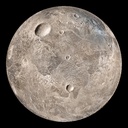
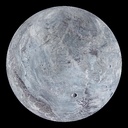
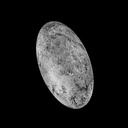
extra/: 1000 in-distribution images, 100 for each existing class. These images were not used during training but are genuine inference examples.extra-classes/: 1000 images of 4 additional dwarf planets from classes the model has never seen. Because the classifier has no unknown class, it can only misclassify them into known classes.
| Ceres | Eris | Haumea | Makemake |
|---|---|---|---|
 |
 |
 |
 |
Ceres, Eris, and Makemake look similar to the Moon and Mercury, and even the more ellipsoid-shaped Haumea shares their texture and aspect. None of them are obvious outliers, making them a realistic drift scenario.
The folder also contains its own .gitignore, so its content is ignored
automatically.
Start from clean logs
The test requests sent in the previous chapter are still in logs/. Remove them
so the drift report only reflects the images sent in this chapter.
Start the local service
Start the BentoML service locally. It will serve the /predict endpoint and
write monitoring logs for every request.
# Start the service (run in a separate terminal)
bentoml serve --working-dir ./src serve:CelestialBodiesClassifierService
Phase 1 - In-distribution images
Send the images from extra-data/extra/*.jpg. These images belong to the same
classes as the training data and should not trigger a drift alert.
# Send in-distribution images
for img in extra-data/extra/*.jpg; do
  curl -X POST -F "image=@$img" http://localhost:3000/predict
done
The service writes JSONL monitoring log files to
logs/celestial_bodies_classifier/data/. These logs act as the production data
that monitor.py will compare against the reference dataset.
# Inspect the monitoring records
cat logs/celestial_bodies_classifier/data/data.1.log
Generate the first drift snapshot and push it to the local workspace:
# Generate the first Evidently snapshot
python src/monitor.py
python src/monitor.py writes two files: monitoring/report.html for the
interactive, human-readable report and monitoring/report.json for the
machine-readable metrics.
Open the HTML report in a browser: the scalar, categorical, and embedding drift scores should generally stay below the configured thresholds, because these images come from the same distribution the model was trained on.

The embedding plot projects the high-dimensional image embeddings onto a 2-D plane. Because these images are in-distribution, their points should sit within or close to the reference clusters, with no clear separation.
Phase 2 - Out-of-distribution images
Send the images from extra-data/extra-classes/*.jpg. These images come from
classes the model has never seen, so they should produce a stronger drift
signal.
# Send out-of-distribution images
for img in extra-data/extra-classes/*.jpg; do
  curl -X POST -F "image=@$img" http://localhost:3000/predict
done
Generate the second drift snapshot:
# Generate the second Evidently snapshot
python src/monitor.py
The second snapshot also writes monitoring/report.html and
monitoring/report.json. In the HTML report, the embedding drift,
predicted-label distribution, confidence, and entropy should all show a
stronger signal than in phase 1. The embedding plot now shows a clearer picture:
the out-of-distribution images form clusters that sit away from the reference
data, making the drift visible in 2-D.

Confidence and entropy
The drift report includes two statistics derived from the softmax output:
- Confidence: the maximum softmax probability. It tells you how strongly the model favors its top prediction. A value near 1 means the model is very sure of one class, while a lower value means the probability mass is spread across several classes.
- Entropy: how spread out the full probability distribution is. Low entropy means a peaked distribution, while high entropy means the model is unsure among many classes.
For in-distribution images the model usually assigns high probability to the correct class, so confidence is high and entropy is low. For the dwarf-planet images the model has no correct class, but because they resemble Mercury and the Moon it may still assign high probability to one of those classes. This means the model can be confidently wrong, which is why monitoring only confidence is risky.
Confidence and entropy are related but not identical. Combining them with predicted labels and embeddings gives a much more robust drift signal than any single metric.
Open the Evidently UI
Start the Evidently UI service over the workspace:
# Serve the local workspace
evidently ui --workspace monitoring/workspace --port 8000
Open http://localhost:8000 in a browser and select the
celestial-bodies-classifier project.

The Dashboard tab shows the monitoring panels and the trend across the two snapshots: the first should show low drift, and the second should show higher drift after the out-of-distribution images arrived. You can also open individual HTML reports from the Reports tab.
Summary
In this chapter, you have successfully:
- Installed Evidently AI
- Built a reference dataset from the training data, including embeddings
- Created a monitoring script that generates an Evidently drift snapshot
- Added embedding drift detection with a model-based detector
- Wired the reference build into the DVC pipeline
- Run the pipeline and generated the reference dataset
- Committed the changes to DVC and Git
- Generated production logs for in-distribution and out-of-distribution images and pushed snapshots to a local Evidently workspace
- Ran the Evidently UI locally and inspected the dashboard
You fixed some of the previous issues:
- Data drift and concept drift can be detected automatically
Take away
- A reference dataset makes drift concrete: Without a reference, you
cannot tell whether a spike in
image_meanorpredicted_labelis normal or a sign of decay. The training set is the natural reference because it is the distribution the model learned from. - Reuse the same features for reference and production: The feature
extraction module from the last chapter is reused in
build_reference.py, so both datasets share the exact same scalar feature definitions. Embeddings are extracted from the same last hidden layer in both the service and the reference script. - Evidently workspaces keep history: Pushing snapshots to a workspace instead of overwriting a single HTML file lets you compare reports over time. The local workspace is the same concept you will move to the cloud in the next chapter.
- Embedding drift catches semantic shifts that pixel statistics miss: A
new storm on Jupiter or a different telescope's processing pipeline may not
change
image_mean, but it will change the model's internal representation. - DVC keeps the reference reproducible: Adding
build_referenceas a DVC stage ensures the reference dataset is rebuilt whenever the training data or model changes.
State of the MLOps process
- Model predictions can be monitored in production
- Data drift and concept drift are monitored
- No automated reports or dashboard are configured
- Drift signals do not trigger actionable alerts
- Drift alerts do not lead to a reviewed decision
Continue to the next chapters to address the remaining items.
Sources
Highly inspired by: